
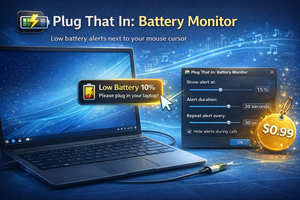
Plug That In: Battery Monitor shows low-battery notifications next to the cursor and lets you customize the battery level, duration, and notification frequency.
It’s easy to accidentally miss the right moment to charge your laptop, which often leads to a rushed search for a power outlet. Standard notifications aren’t always convenient or even visible.
That’s why you can use Plug That In: Battery Monitor — an app that displays a charging reminder right next to your mouse cursor. This way, you’ll definitely notice it and can plug in at a convenient time.
Of course, you don’t want to see an annoying alert all the time. That’s why the utility lets you fine-tune all the necessary settings:
- Battery level at which the notification appears;
- Notification duration;
- How often notifications repeat;
- Hide notifications during calls.
Price
You can’t try Plug That In: Battery Monitor for free — the app must be purchased for $0.99.