
Did you know that Windows keeps track of all the USB flash drives that have been connected to it? And you can view this information at any time using special utilities.
USBDeview is just such a utility—it lets you manage USB devices, view detailed information, enable or disable them, delete them, and test their speed.
Immediately after launching the app, you'll see all the system information about every USB device that is currently connected to—or has ever been connected to—your PC.
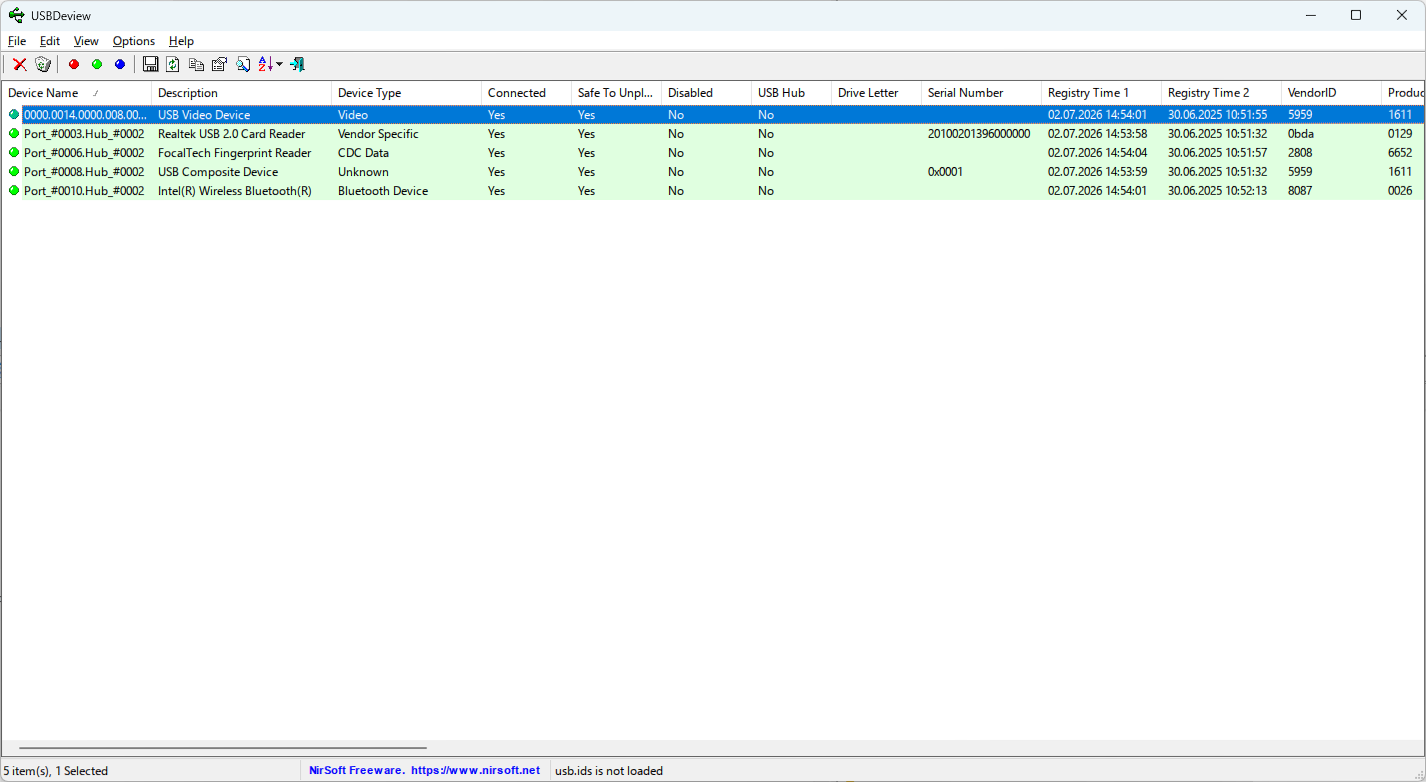
For each device, you can view:
- Device name, description, and type;
- Manufacturer, model, VID/PID, and serial number;
- Drive letter (for storage devices);
- USB version, class, subclass, and protocol used;
- The port (Hub/Port) through which the device is connected;
- Driver information: name, version, INF file, service, and class;
- Time of first connection, last connection, and disconnection;
- Current status (connected, safe to remove, disconnected);
- Power consumption and supported device features.
When viewing the list, you can choose to display disconnected devices, USB hubs, or only storage devices; choose to run the program with administrator privileges; receive notifications about device connections and disconnections; minimize the program to the system tray; display time in milliseconds or GMT; and configure automatic sorting, font, and other interface settings.
The device list itself can be exported. In addition, there are several useful features for working with the devices themselves. For example, you can create a shortcut to quickly connect and disconnect a device, reconnect a device, or quickly turn off and reconnect all devices.