
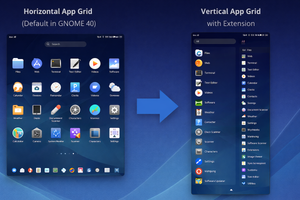
In GNOME 40, you can bring back vertical app scrolling: the Vertical App Grid extension changes the orientation and lets you customize the app grid.
Starting with version 40, the GNOME Shell app launcher uses horizontal scrolling with multiple pages. If you don’t like this behavior, it’s easy to fix.
Install the Vertical App Grid extension, and the app list will scroll vertically again, showing all applications in one continuous list.
0:00
/0:19
In addition, you can change the icon size and spacing, or adjust the number of columns.